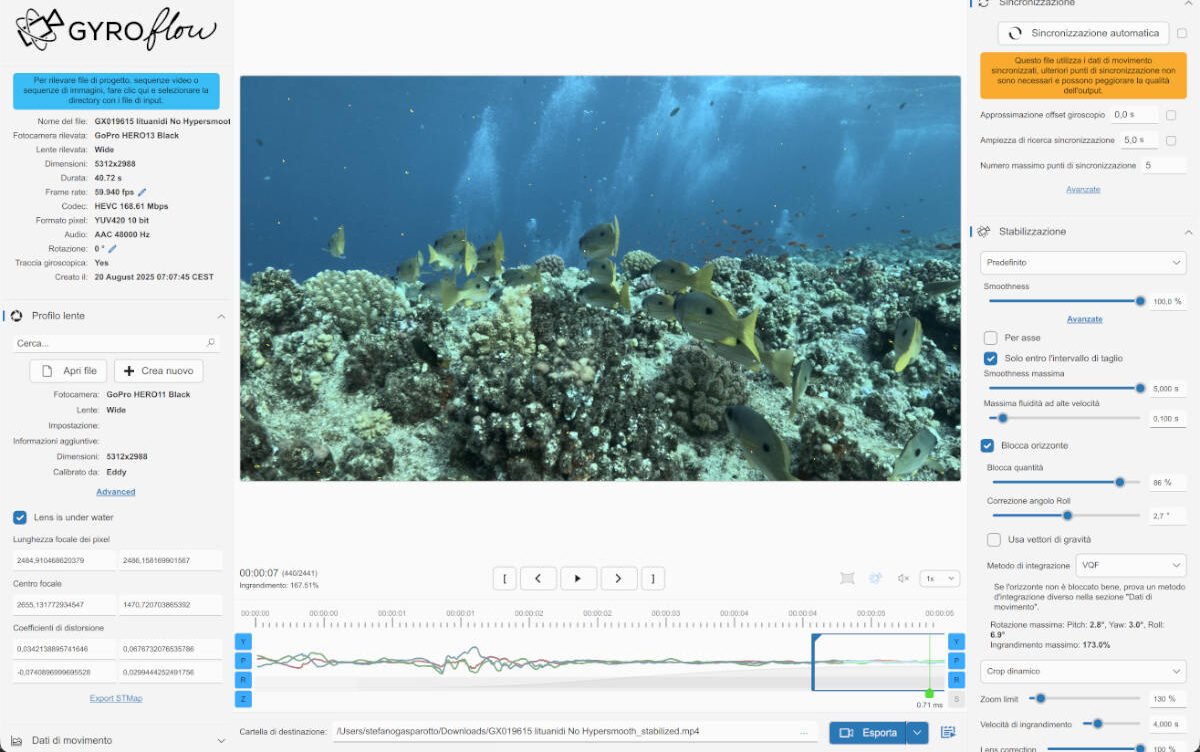
Gyroflow: Beyond Hypersmooth
During my test dives with GoPro Labs, I happened to accidentally disable stabilization more than a few times. That is when I realized that underwater, regardless of perfect buoyancy, it is very difficult to produce good footage without stabilization. Correcting a very shaky clip with a standard editing app is not easy.
This is where Gyroflow comes into play. Unlike traditional systems that visually analyze frames, this application utilizes the inertial data recorded by the camera’s sensors.
Its operation is based on the synchronization between the video stream and the gyroscope and accelerometer metadata. During recording, the GoPro stores every vibration or rotation on a dedicated track within the file. Gyroflow extracts this information and applies an inverse geometric transformation to the image, precisely compensating for unwanted movements.
A fundamental aspect of this workflow concerns lens distortion management. Gyroflow uses specific mathematical profiles for each sensor and lens, allowing for extremely accurate straightening of the curved lines typical of wide-angle lenses.
To achieve results, it is necessary to disable the camera’s internal stabilization, leaving the sensor free to capture the entire available field of view.
Using the application is immediate: once the video file to be stabilized is dragged into the interface, the software automatically recognizes the camera model and the integrated gyroscope metadata. In just a few moments, the app loads the optical profile corresponding to the lens used and aligns the gyroscope movement with the images, making the video ready for adjustment.
Through the adjustment controls, it is possible to decide in real time how much crop margin to apply, immediately observing the effect on the fluidity of the footage. Unlike in-camera stabilization, which is permanent and non-modifiable, Gyroflow allows you to test different stabilization intensities on the same file, finding the ideal compromise between field of view width and stability. Once the desired setup is found, the process concludes with exportation, generating a new high-resolution, stabilized video file.